
 By
By The end of 2025 is almost here, so in our last blog post of the year, we’re going to take a look back at EverWeb in 2025!
We’re going to start our end of year review at the end of 2024 which saw the release of EverWeb 4.3 for macOS and Windows. The December 2024 release, and the following, EverWeb 4.4, are releases that build one upon the other, so a lot of groundwork for EverWeb 4.4 is set up by EverWeb 4.3.
EverWeb 4.3: December 2024
EverWeb 4.3 introduced a new widget for PayPal users – the PayPal Modern widget. This new widget provides up to date functionality that the previous widget could not achieve. This means new payment options as the widget supports the PayPal button API. You use the widget with your PayPal Client ID which enables you to display the modern PayPal button. The button type can be set to either for purchases or subscriptions. The new widget also allows you to set the Payment Sources you want e.g. Debit and Credit Cards, SEPA Direct Debits, PayPal Later and so forth. In addition, you’ll see most of the old widgets features in the new widget!
We recommend replacing the original PayPal widget with the new PayPal Modern widget wherever possible as the PayPal Modern widget will be the default from now on. That means that it will be the one to see updates in the future. The original widget, now more than 10 years old, probably won’t be updated anymore.
The late 2024 release also focused on improvements in the are of Text. Added in this release was the Scrollable TextBoxes. To use this feature, select the TextBox that yo want the text to scroll in, then check the checkbox next to ‘Scrollable Text’ in the Export Options section of the Text Inspector. If you Preview or Publish your site, you’ll see that the text will be scrollable in the TextBox!
Also debuting in the 4.3 release was the introduction of Justified Text for TextBoxes. This has been long awaited amongst EverWeb users and joins the already existing capability in EverWeb’s Blog and the Styled Text Editor that is used in some of EverWeb’s widgets.
For macOS users there was a small feature update as the fonts in the Fonts menu in the Text Inspector now show the font itself in the list.
EverWeb 4.3 also introduced the new ‘QR Code for Mobile Preview’ feature, Now it’s super easy to see a preview of your page on a mobile device, just scan the QR Code. This means that you can preview a page on both mobile phone and tablet devices. It’s a no fuss, instant results feature!
Under the hood, changes were made to prepare for the next version of EverWeb. Although it was a long wait, nine months, EverWeb 4.4 arrived with a bang!
EverWeb 4.4: The Big Release
EverWeb 4.4 was touted as ‘The Big Release’ and with good reason! Here’s a rundown of its major features…
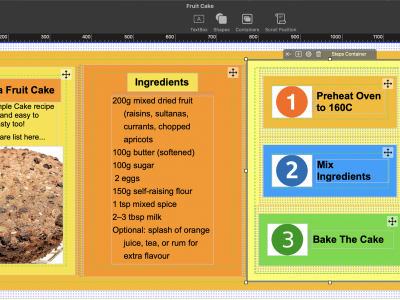
The first big feature is Containers which are best used in Responsive Websites. Containers give you the freedom to design how you want within a Responsive environment: Horizontally, vertically or in a free-form format. You can embed containers within each other, and can even change the container type if you need to at a later stage. You can also add almost any kind of object to a Container giving you immense design freedom!
The second big feature added, Margins and Padding, lets you have complete control over the margins and padding of any object on the design canvas. This is probably more useful to Responsive pages as it gives you the freedom to distribute objects evenly in Responsive Rows and Containers so it’s easier to create a more free form look. Again, this feature helps to expand your design creativity in a responsive environment.
The third major feature add in this release was Scrolling Effects. These allow you to pin objects on your page using one of six different Scrolling Effects: Pin Stack, Pin Push, Pin To Left, Pin To Right, Pin To Top and Pin To Bottom. There are lots of ways in which you a customize how a Scrolling Effect works as well. For example you can choose where a scroll start positions and what happens to the object when it scrolls. Here you have seven options: Fade, Blur, Color-swap, Rotate, Remove, Scale, and custom scroll speed.
Mouse Effects and Transitions were also added in to EverWeb 4.4 allowing you to add one of 41 different effects when you either mouse over an object or mouse down on an object.
There’s also a great way to change the way in which the corners of your objects look with the new Borders section in the Shape Options tab. this is a simple yet amazing way to make your page design pop. You can apply a custom border to any corner of most objects.
The last notable feature to come with EverWeb 4.4 is an improvement to the Navigation Bar widget which now adds new Mouse-Down Fill options that have often been asked for by EverWeb users!
Coming To EverWeb In 2026…
Although 2025 has been a big year for EverWeb, we expect 2026 to also be a big year for the website building software! Already EverWeb 4.5 is in the works, with one new feature, Popup Windows, teased on X by @everwebapp! This looks like an overhaul for EverWeb’s existing popup window feature making it fully customizable and fully featured! We’re looking forward to seeing what other features will be teased before the official release next year!
What would you like to see in the upcoming releases of EverWeb in 2026? Let us know in the Comments below!




 Loading ...

Comments